
ERP, CRM, and tools integration for Quebec SMEs: connect without re-entry
Most SMEs don't suffer from a lack of software; they have too much, and that software doesn't talk to itself. The CRM ignores what accounting sees, inventory lives in its own corner, and in between, employees copy data by hand. This invisible work is expensive, generates errors and holds back growth.
Systems integration means moving information automatically between your tools, so each piece of data is entered once and stays consistent everywhere. This guide explains why it's often the highest-return project for a Quebec SME, and how to approach it concretely.
The real cost of disconnected ERP and CRM systems
When your tools are disconnected, the cost doesn't show up on an invoice; it hides in daily operations:
- Double, triple entry: the same customer keyed into the CRM, then invoicing, then inventory. Wasted time, multiplied every day.
- Transcription errors: a number copied wrong, and that's a faulty order or an incorrect invoice.
- Conflicting data: which system is right when the CRM and accounting disagree on a balance?
- Decisions in the dark: without a unified view, it's impossible to know in real time what a customer or product truly earns you.
For many SMEs, this hidden cost far exceeds that of an integration project, exactly the kind of gain you quantify in an ROI calculation.
What ERP and CRM integration actually means
Integrating two systems means letting them exchange data automatically. In practice, this most often goes through APIs (application programming interfaces): one system exposes its data and accepts updates, the other connects to it. When a sale closes in the CRM, the information flows to accounting with no human intervention.
Three broad approaches exist, from lightest to most robust.
Off-the-shelf connectors
Tools like automation platforms (iPaaS type) offer prebuilt connectors between popular software. Pro: fast, inexpensive for standard cases. Con: limited to anticipated scenarios, recurring subscription cost, and often insufficient as soon as business logic gets complex.
Custom API integration
You develop the exact bridge you need, with your business logic. Pro: fits your processes precisely, and you own it. Con: higher upfront investment, justified when the flow is central or particular.
The central platform (hub-and-spoke)
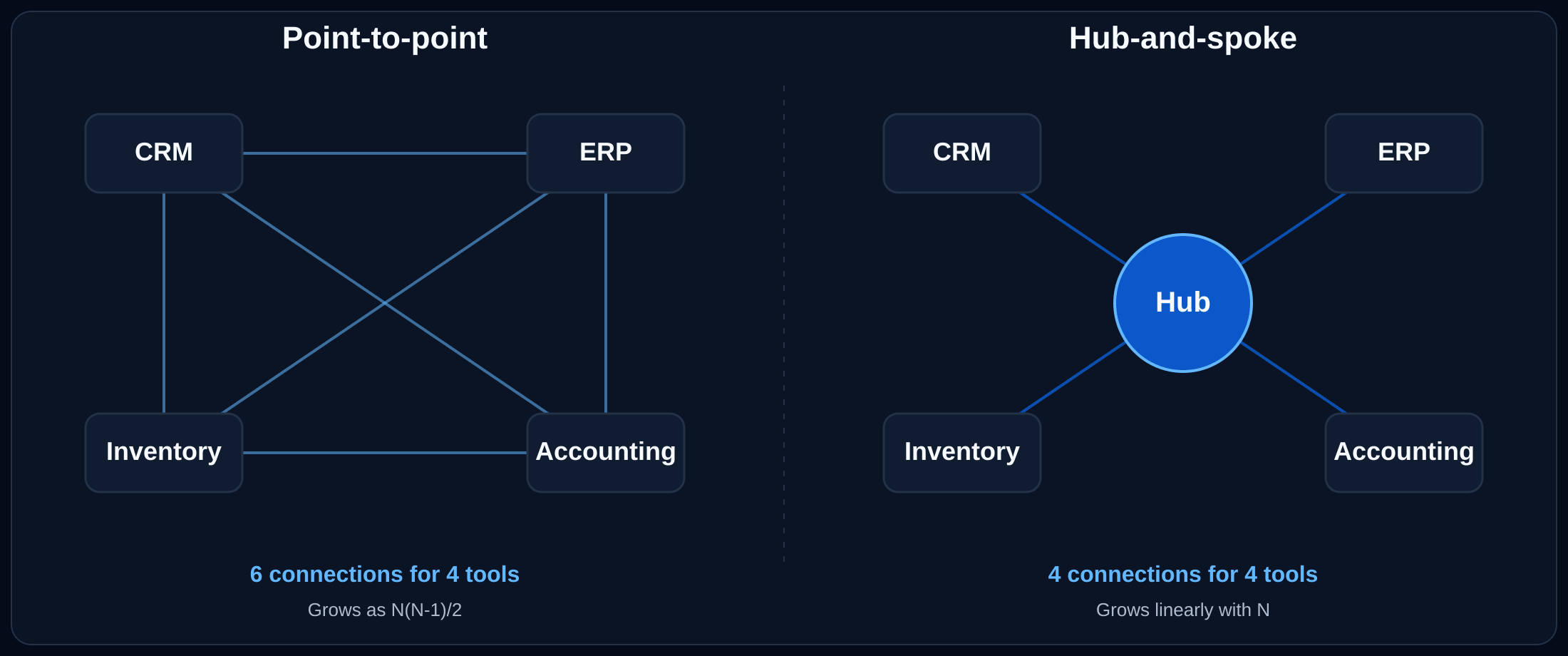
Rather than connecting each tool to every other one, you build (or buy) a single central layer. Every system connects only to the hub, and the hub routes the data wherever it needs to go.
The reason this matters is math. With point-to-point integrations, the number of connections grows as N(N-1)/2: four systems already need 6 wires, six need 15, ten need 45. Each new tool requires connecting it to every existing one, and every change ripples outward. With a hub, the count grows linearly: ten systems need ten connections. The hub becomes the only place where logic, retries, monitoring, and access control live.
In practice, the hub is one of three things:
- A commercial iPaaS like MuleSoft Anypoint, Dell Boomi, Workato, or Make / Zapier used in a centralized way. You get pre-built connectors, retry logic, monitoring and transformations out of the box. Best when your team is small and the tools are mainstream.
- An event bus like Kafka, AWS EventBridge or RabbitMQ. Systems publish events ("invoice paid") and the hub routes them. Best for high-volume real-time flows and decoupled microservices.
- A custom middleware you build yourself, typically a small Node or Python service with a database and a few queues. Right answer when iPaaS pricing scales worse than engineering it, or when your business logic is too specific for off-the-shelf flows.
When the hub is worth it: usually starting at the third or fourth system. Below that, point-to-point is cheaper. Above that, every new integration on the hub takes a fraction of the time of a fresh point-to-point connection, and when one system changes, you fix it in one place instead of N.
Useful rule: for one or two simple flows between common tools, an off-the-shelf connector often suffices. As soon as the logic is specific or the systems multiply, custom or a hub become more economical over time.
The most profitable integrations for an SME
Not all integrations are equal. The ones that pay off fastest generally touch:
- CRM ↔ accounting: from quote to invoice with no re-entry, with payment tracking.
- E-commerce ↔ inventory ↔ accounting: up-to-date stock, synchronized orders, accounting fed automatically.
- Website ↔ CRM: form leads land directly in the sales pipeline.
- Internal tools ↔ payroll / HR: timesheets, leave, consistent employee data.
The common thread: eliminating a daily re-entry or a recurring source of error. It's often the first step in a broader process automation effort.
How do you pick which integration to do first? We walk through a 3-factor scoring framework (volume, time per execution, business stakes) in How to Choose What to Automate First, and the same logic applies to integration projects.
Common ERP and CRM integration mistakes (and how to avoid them)
Integration looks simple on paper: "just connect A and B." Reality holds pitfalls:
- Old systems with no API: a closed legacy program may offer no clean way to access its data. Workarounds exist, but they cost and they're fragile.
- Data quality: integrating two databases full of duplicates and inconsistencies spreads the mess faster. Cleanup beforehand is often necessary.
- Field mapping: "customer" in one system isn't "contact" in another. Precisely defining these mappings is half the work.
- Error handling: what happens when a system is offline or rejects a piece of data? A good integration plans for failures, retries and alerts.
- Security and compliance: moving personal data between systems engages your responsibility under Law 25.
Integrate vs replace: how to decide
Sometimes the best integration is not to integrate. If you're paying for several poorly fitting subscriptions that you connect with great effort, the question may not be "how do we connect them" but "should we replace them with a single system." That's the trade-off we detail in our custom or SaaS comparison.
Conversely, if each tool does its job well in isolation, integration is far cheaper than a replacement and preserves what works. The right reflex: integrate what's good, replace what isn't.
A concrete example: a Quebec SME's CRM-to-accounting integration
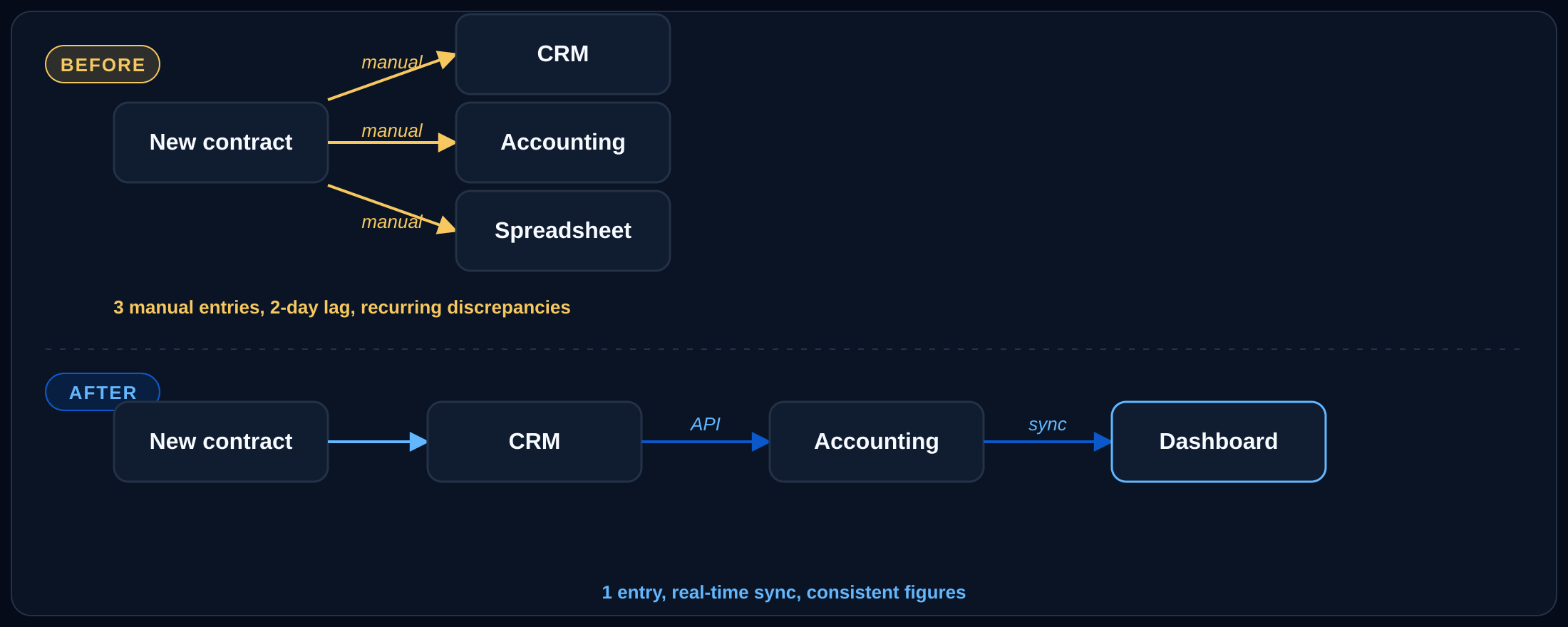
A Quebec professional-services SME used a CRM for sales, a separate accounting program, and a shared spreadsheet to track ongoing projects. Each new contract was entered three times. Worse, management had no consolidated view: to know where the quarter's revenue stood, someone manually compiled the three sources, a day or two late and with regular discrepancies.
The integration connected the CRM to accounting via API: a won contract automatically creates the customer and the project on the accounting side, and payment status flows back into the CRM. The tracking spreadsheet was replaced by a small dashboard fed by both systems. Result: no more triple entry, consistent figures in real time, and a management team that finally sees its situation day to day. The project paid for itself in a few months from recovered admin time alone, and part of the development, being non-trivial, qualified for tax credits.
How to launch an integration project
A sound approach comes down to a few steps. First, map your flows: what data moves from one system to another, and who re-keys it by hand today. Then prioritize: tackle the costliest or riskiest flow first, not everything at once. Next, check the available APIs of each system, as that's what determines feasibility and cost. Finally, clean the data before connecting, so you don't automate the mess.
This discipline mirrors that of a good requirements document: clarifying the need before building avoids nasty surprises.
Frequently asked questions
How much does systems integration cost in Quebec?
It varies enormously with the number of systems, the existence of clean APIs and the complexity of the logic. A simple bridge between two modern tools can cost a few thousand dollars; a central integration across several systems, some of them legacy, is a five-figure project. Part is often eligible for tax credits.
Can you integrate an old program with no API?
Often yes, but by less clean means (file exports, direct database access, robotization). It's doable, more fragile, and worth weighing against whether replacing the old system would be wiser.
Is an off-the-shelf connector or custom better?
For a standard flow between common tools, an off-the-shelf connector is fast and economical. As soon as the logic is specific to your business or the systems multiply, custom becomes more robust and often cheaper over time.
Does integration put my data at risk?
Done well, no; on the contrary, it reduces transcription errors. But moving personal data engages your Law 25 responsibility: encryption, controlled access and compliant hosting must be planned from the design stage.
Move your data, not your employees
Integration is rarely the most visible project, but it's often the one that frees the most time and makes your decisions the most reliable. The right starting point isn't technology: it's the map of your flows and the hunt for the re-entries that cost you every day.
Our software development and cloud and DevOps services include designing and building robust integrations between your systems. Book a free discovery call and we'll map your flows together to target the most profitable integration.