
Every Quebec SMB eventually faces the custom software vs SaaS question: subscribe to an existing solution (like a CRM, an ERP or a subscription management tool), or have software built specifically for your needs? Both approaches are legitimate, and the wrong choice is expensive: either in subscriptions that pile up, or in developing a feature you could have rented for $50 a month.
This guide gives you a clear framework to decide, without dogma, based on your business reality.
Custom software vs SaaS: what each option really means
A SaaS solution (software as a service) is a ready-made product you rent by subscription. You don't own it; you pay to use it, and the vendor handles hosting, updates and maintenance. Think of the big CRMs, accounting tools or project-management platforms.
Custom software is built for you. You own it, it fits your processes exactly, and you decide how it evolves. In exchange, you pay for the initial development and the maintenance.
The fundamental distinction: with SaaS, you adapt your business to the software; with custom software, you adapt the software to your business.
The real cost of SaaS vs custom software: the subscription that never stops
SaaS looks unbeatable at first: no big investment, you subscribe and start. But the real cost reveals itself with time and scale.
Imagine a tool at $60 per user per month. For 5 employees, that's $3,600 a year, which is reasonable. But at 40 employees, it's $28,800 a year, every year, forever, rising with each price increase and each new employee. Over five years, that's more than $140,000, without ever owning anything.
At that level, custom software that automates the same need often becomes cheaper overall, especially after tax credits. The tipping point depends on the number of users, the cost per seat and how specific your needs are.
Use our custom software ROI calculator to model your specific scenario, Quebec tax credits included.
Rule of thumb: the more users you have and the more unique your process, the more custom software becomes advantageous. Few users and a standard need? SaaS almost always wins.
When SaaS is the right choice
- Your need is standard and well served by existing products (email, basic accounting, e-signature).
- You have few users and the subscription cost stays modest.
- You want to start immediately with no development phase.
- The process is not a competitive advantage: it just needs to work.
- You'd rather someone else manage hosting, security and updates.
When custom software is the right choice
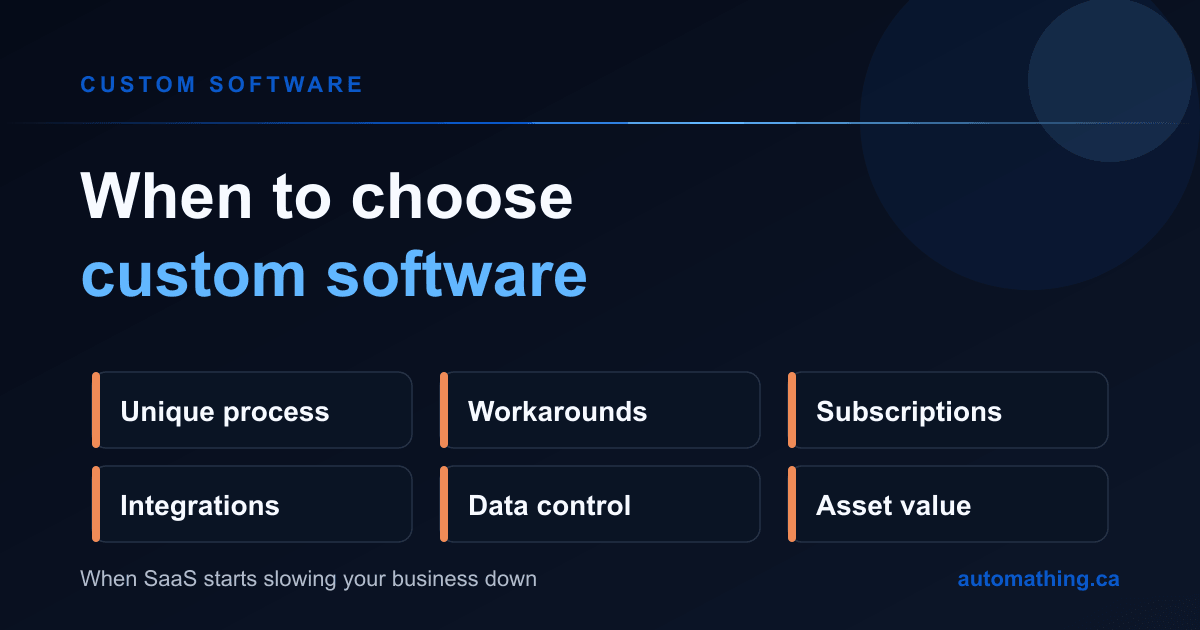
- Your process is particular and constitutes a competitive advantage that's hard to replicate.
- No SaaS truly fits your way of working (you "bend" your business to fit the tool).
- You already pay for several costly subscriptions that could be replaced by a single system.
- You need deep integrations between your systems that SaaS doesn't allow.
- Data control is crucial (Law 25 requirements, Canadian hosting).
- You want to own the asset rather than rent indefinitely.
The over-configured SaaS trap
The costliest scenario is neither pure SaaS nor custom software: it's the SaaS you twist to fit your needs. You pay the subscription, plus consultants to configure it, plus patched-together integrations, plus employees' time spent working around its limits. You end up paying the price of custom software without its advantages. When you catch yourself saying "our tool doesn't do that, so we keep an Excel file on the side," that's a strong signal that custom software deserves consideration.
The hybrid approach: often the smartest for Quebec SMBs
Rare is the business where everything must be custom or everything SaaS. The winning strategy is usually mixed: SaaS for the commonplace (email, accounting, payroll), and custom software for the unique core of your activity. The challenge then becomes connecting these systems cleanly, via a well-designed integration, so your data flows without re-entry.
That's exactly what we recommend to most SMBs: pay for custom software only where it creates a real advantage, and rent the rest.
A concrete case: the Quebec distribution SMB stacking subscriptions
Take a Quebec distribution business of about forty employees. Over the years it had accumulated seven SaaS subscriptions: a CRM, a quoting tool, inventory software, a signature platform, a support-ticketing tool, an "augmented" shared spreadsheet and a connector between some of them. Combined monthly bill: nearly $4,200, or more than $50,000 a year, rising with every hire.
The real problem wasn't just the cost: none of these tools really talked to each other. The same customer was entered three times, the inventory shown in the CRM was always a day behind reality, and two full-time employees spent their days copying data from one system to another. The business was paying full SaaS price and the human cost of manual re-gluing.
Analysis showed that five of the seven tools served a sale-to-delivery process unique to their business model, a genuine competitive advantage poorly served by generic products. We replaced those five subscriptions with a single custom application connected to their accounting (kept in SaaS, since standard) and their e-signature (likewise). Result after eighteen months: the two re-entry roles reassigned to value-added work, inventory errors nearly eliminated, and a total cost (amortized development plus maintenance) below what the cancelled subscriptions had cost, before even counting tax credits. The two tools that stayed in SaaS had no reason to be rebuilt.
The lesson isn't "custom software always wins." It's that the right split (custom software for the unique core, SaaS for the commonplace) almost always beats both extremes.
How to decide: a concrete custom software vs SaaS checklist
Do this simple exercise. List your current software tools and, for each, note: total annual cost, number of users, and whether the tool forces you into workarounds. Any tool that's expensive, heavily used and poorly fitted is a candidate for replacement with custom software. Any tool that's cheap, lightly used and standard stays perfect in SaaS.
Add the three-to-five-year projection: a subscription that climbs with your growth can justify a one-time investment that doesn't climb.
Frequently asked questions
Is custom software always more expensive than SaaS?
At the start, yes. But SaaS is paid indefinitely and rises with the number of users. Past a certain volume, or for a very specific need, custom software becomes cheaper overall, especially after Quebec tax credits.
Can I start with SaaS then migrate to custom software later?
Absolutely, and it's a frequent path: validate the need with SaaS, then develop custom software when the limits or costs become constraining. Keep your data to make the migration easier.
How do I know if custom software would be more cost-effective than my SaaS stack?
If you're multiplying parallel Excel files, paying consultants to configure your tools, or often hearing "the tool doesn't do that," you're probably already paying the price of custom software without its benefits. Our ROI calculator can help you run the numbers.
Make the choice that serves your growth
There's no universal answer: there's the right answer for your SMB, your processes and your trajectory. The winning reflex is to analyze your real costs over several years and reserve custom software for what truly sets you apart.
We help Quebec SMBs do this calculation and build, when justified, custom software that replaces stacks of subscriptions. Book a free discovery call and we'll assess together what's worth custom software, and what isn't.