
Many Quebec SMEs still run software on a server in a closet, or on the aging tower PC under the accountant's desk. It works, right up until the day it doesn't: a hardware failure, a missing backup, no way to work remotely, or a steep replacement bill. The cloud answers these problems, but a migration takes method.
This guide explains, in plain language, what the cloud really brings to an SME, the possible migration strategies, what it costs, and how to stay compliant with Law 25 along the way.
Why move to the cloud: what actually changes for an SME
Migrating to the cloud means you stop hosting your software and data on hardware you own and maintain, and instead run them on a provider's infrastructure, accessible over the internet. The concrete benefits for an SME:
- No more hardware to manage: you stop buying, maintaining and replacing servers. You rent exactly what you need.
- Access anywhere: your teams work from the office, home or the job site, on the same up-to-date data.
- Elasticity: you scale up during a spike, scale back down after. You don't pay for an oversized server "just in case."
- Resilience: automatic backups, redundancy, disaster recovery, all hard to deliver with a single server.
- Security: major providers invest in security far beyond what an SME can afford on its own, provided you configure it well.
The 4 cloud migration strategies: the "R" framework
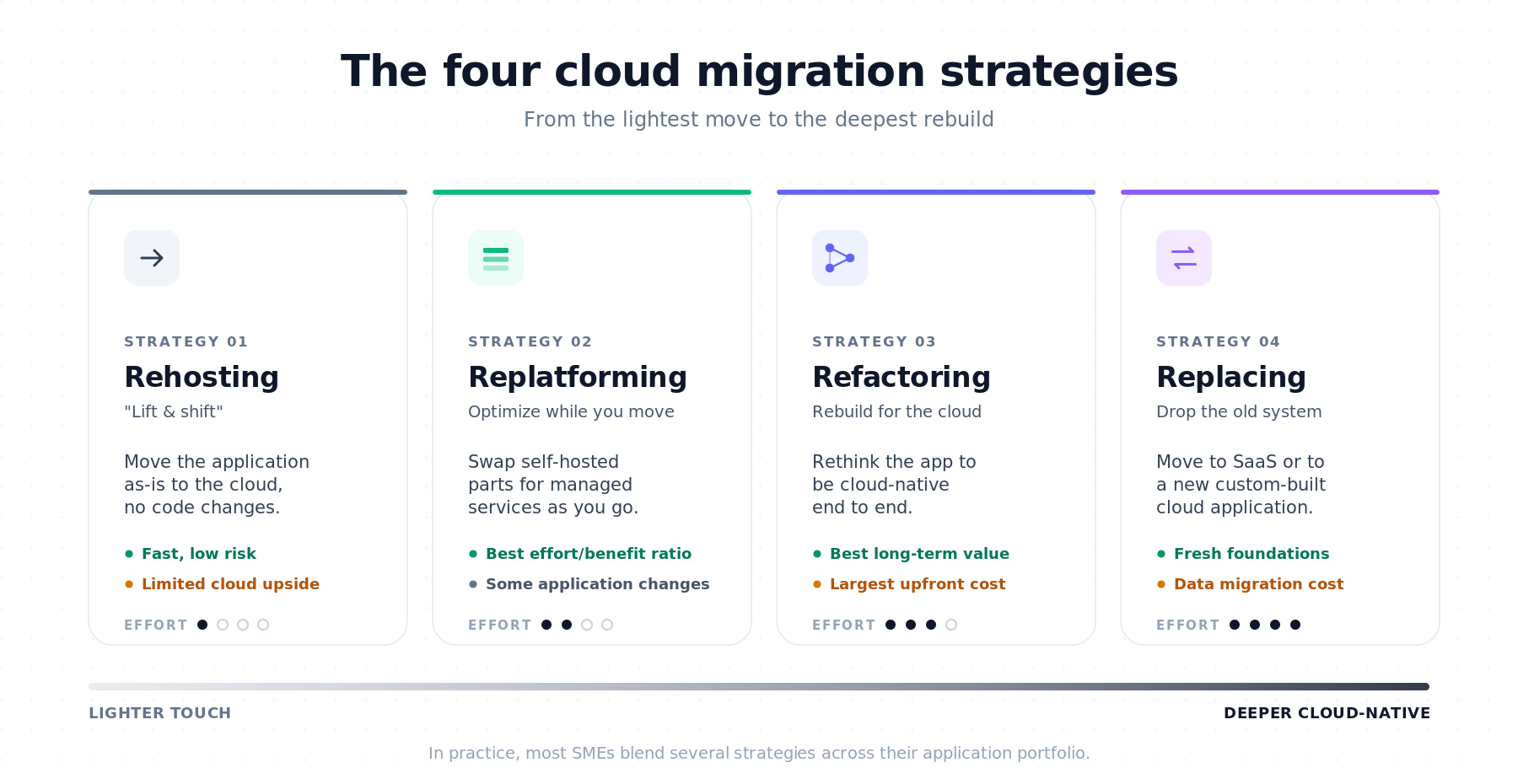
There's no single way to migrate. Depending on the application, you pick a different approach. The industry calls these the "R" strategies.
Rehosting: the "lift and shift" cloud migration
You move the application as-is to the cloud, without modifying it. Pro: fast, low risk. Con: you don't fully exploit the cloud's capabilities. A good starting point for stable applications.
Concrete example: an SME lifts its on-premise Windows Server, hosting a legacy accounting application, onto an Azure or AWS virtual machine without changing the application itself.
Replatforming: optimize while you migrate
You move the application while optimizing it a little (for example using a managed database rather than a self-hosted one). A solid effort-to-benefit trade-off.
Concrete example: the self-hosted PostgreSQL database powering the CRM is swapped during the move for AWS RDS or Azure Database for PostgreSQL, removing the burden of patching and backups while leaving the application code largely untouched.
Refactoring: rebuild for cloud-native performance
You rethink the application to fully exploit the cloud (modern architecture, managed services). Pro: performance and costs optimized over time. Con: more upfront effort, often reserved for strategic applications.
Concrete example: a monolithic order-management application is broken into containerized services on AWS Fargate or Azure Container Apps, with autoscaling and a managed message queue handling nightly batches that used to lock up the server.
Replacing: switch to SaaS or custom cloud software
You abandon the existing application for a cloud solution (often SaaS) or modern custom software. Relevant when the old system is at end-of-life.
Concrete example: a 15-year-old in-house CRM is retired in favor of HubSpot (or a purpose-built custom application), the customer data is migrated, and the legacy server is decommissioned.
In practice, an SME often mixes these strategies: a "lift and shift" for simple applications, refactoring for the critical system, and replacement for what's obsolete.
Cloud migration and Law 25 compliance: where does your data live?
This is the point Quebec SMEs neglect most, and it's crucial. Law 25 governs the protection of personal information, and transferring data outside Quebec requires a privacy impact assessment. In plain terms: sending your customer data to servers abroad isn't something you do lightly.
The good news: the major cloud providers offer Canadian regions (notably in Quebec and Ontario) that let you keep your data in the country. Choosing a Canadian region and documenting that choice greatly simplifies your compliance. It's a criterion to fold into migration planning from the start, not after the fact.
How much does cloud migration cost for a Quebec SME?
A migration's cost breaks down into two parts: the migration project itself (planning, moving, testing) and the recurring hosting costs once you're in place.
The project varies with the number of applications, their complexity and the chosen strategy; a simple "lift and shift" of one application costs a fraction of a full refactoring. The recurring costs depend on your actual consumption (compute power, storage, traffic).
The classic trap is the bill that runs away from lack of monitoring. The cloud bills by usage, and forgotten or oversized resources inflate the tab. Good cost-optimization practice ("FinOps"), meaning monitoring, right-sizing, and turning off what isn't being used, often saves 20 to 40% on the monthly bill. These recurring costs should appear in your ROI calculation from the start.
A Quebec-specific bonus: certain modernization work tied to the migration may be eligible for tax credits or the ESSOR program, reducing the net cost.
The 5 steps of a successful cloud migration
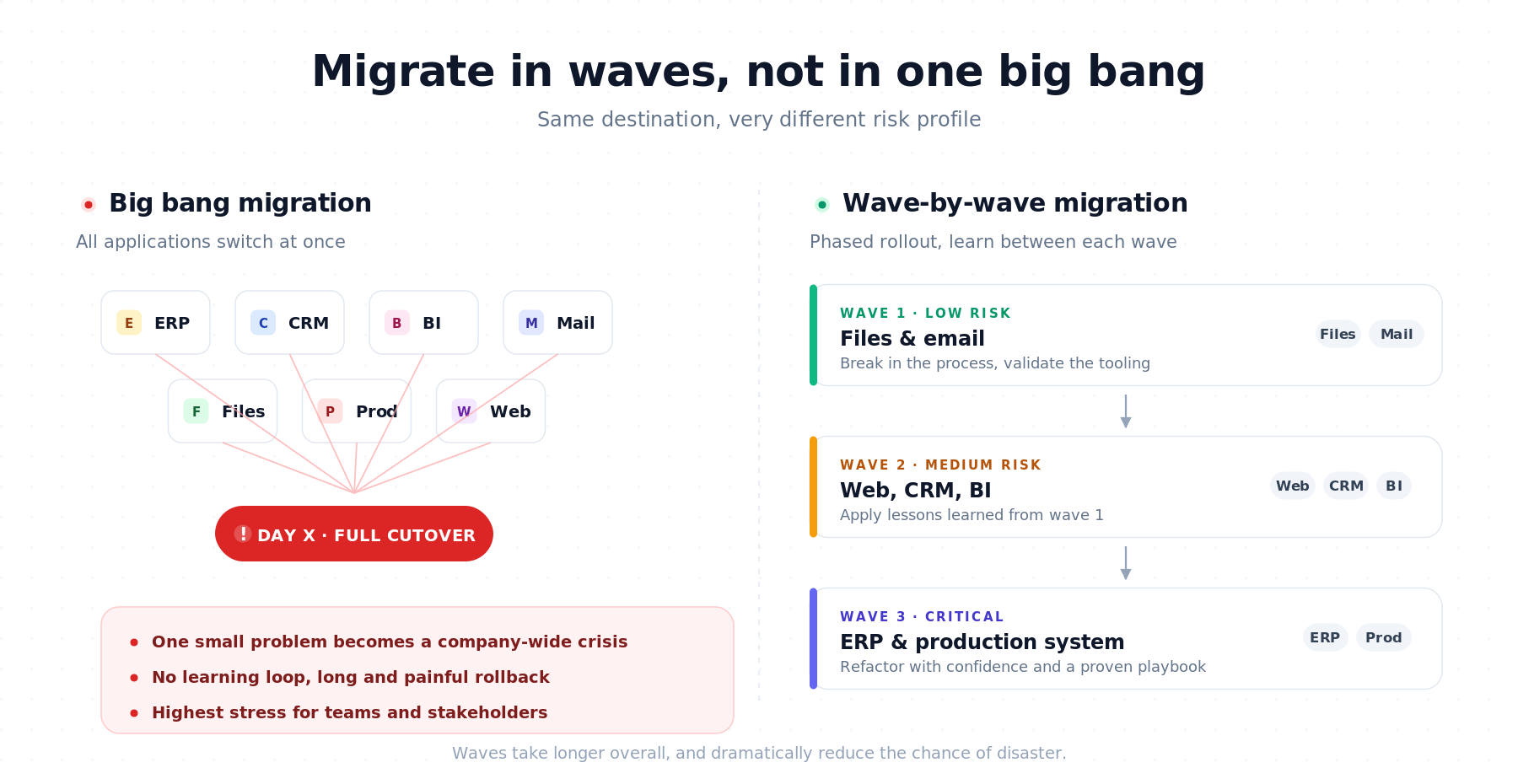
A serious migration follows a clear sequence. You start with an inventory: which applications, which data, which dependencies. You then prioritize what migrates first, often a low-criticality application, to break in the process. You choose the strategy for each application (the "R"s above) and the hosting region (Canadian, for Law 25). You migrate in waves, testing at each step, rather than all at once. Finally, once the system is stable, you optimize security, costs, and performance.
This wave-by-wave progression is the key: it limits risk, lets the team learn as it goes, and avoids the "big bang" migration where everything switches at once and the smallest problem becomes a crisis.
Cloud migration case study: a Quebec manufacturing SME
A Quebec manufacturing SME ran its production-management system on a single on-site server. A disk failure paralyzed the plant for a full day; the last usable backup was three days old. The incident triggered the decision to migrate.
Rather than moving everything at once, the team started with shared files and email (low risk), then "replatformed" the production system to a managed database in a Canadian region, Law 25-compliant. Backups became automatic and redundant. Six months later: remote access for supervisors, no more fear of hardware failure, and a predictable, optimized monthly bill. The migration cost was lower than the replacement server they'd have had to buy anyway, not to mention the lost plant day that won't happen again.
Cloud migration and DevOps: getting more value after the move
Migrating is only the first step. Once in the cloud, modern DevOps practices (automated deployments, monitoring, infrastructure as code) transform how you evolve your software: faster, safer, with fewer risky manual interventions. That's often where the cloud reveals its full value, well beyond the simple move.
Cloud migration FAQ for Quebec SMEs
Is the cloud really cheaper than a local server?
Not always on raw cost, but often on total cost: you cut out hardware purchase, maintenance and replacement, you pay for actual usage, and you gain resilience. Left unmonitored, though, the cloud can get expensive, hence the importance of cost optimization.
Is my data safe in the cloud?
The major providers offer security superior to what an SME can build alone, but configuration is your responsibility. A properly executed migration generally strengthens security rather than weakening it.
Do I have to keep my data in Quebec to comply with Law 25?
Not strictly required, but transferring personal information outside Quebec requires a privacy impact assessment. Choosing a Canadian region greatly simplifies your compliance.
How long does a cloud migration take?
From a few weeks for a simple application in "lift and shift" to several months for a complex portfolio of applications migrated in waves. Progressive migration takes longer but sharply reduces risk.
Plan your Quebec SME's cloud migration with a real strategy
The cloud isn't an end in itself: it's a means to gain resilience, flexibility and access while controlling your costs. Success comes down to method: inventory, prioritize, migrate in waves, and keep an eye on compliance and the bill.
Our cloud and DevOps services cover the planning and execution of Law 25-compliant cloud migrations, with cost optimization. Book a free discovery call and we'll define the right migration strategy for your SME, together.